
The laptop is already on the kitchen table. The TV has a spare HDMI port. Your kids have seen motion games at a friend's house, and you'd rather not buy another box. So is the laptop we already have enough, or is there a gadget you've missed?
The short answer: Motion games without a console need a Windows or Mac computer with a webcam, some clear floor and decent light on the player. A TV connected by HDMI is optional. Options run from free browser games such as Zazti to downloaded games, including ours, which ask for about 1.2 to 1.8 m (4 to 6 ft) of space (makers' pages, checked 31 October 2026).
We make Fun Motion Labs, so weigh our entry with that in mind. This guide to motion games for PC covers our games in full. Everything about the other options comes from their makers' own pages, and we haven't tested them ourselves (how we check sources). Prices and availability checked on 31 October 2026.
Do motion games need a console, or just a webcam?
No console is needed for motion games on a computer. Motion games without a console use the computer's webcam as the motion sensor. A Windows or Mac laptop or PC with a camera does the job a console camera does.
The computer runs the game and the webcam watches the player. The one change is that the laptop faces the room instead of you.
If another box under the TV makes you sigh, this is the route to look at first.
Motion games for PC: what each route needs
Motion games for PC and Mac use the webcam as the motion sensor. Compared with a TV camera box or a Switch, the differences are what you buy, how much floor you clear and what the player holds.
You may see these called movement games for PC, or physical games for PC. In motion sensor games for PC and motion control games for PC alike, the sensor is usually the webcam you already have.
| What you need | A computer and webcam (ours as the example) | A TV camera box (Nex Playground) | A Nintendo Switch |
|---|---|---|---|
| What you buy | Only the games (you use your own computer) | The box ($299 in the US), with five games | A Switch or Switch 2, the game, and a USB-C camera for camera minigames |
| Floor space | About 1.2 to 1.8 m (4 to 6 ft) for ours | About 1.8 x 1.8 m (6 x 6 ft) | Not stated on the pages we checked |
| Screen | The laptop screen, or a TV by HDMI | A TV or projector by HDMI | Varies by game |
| In the player's hands | Nothing | Nothing (a remote for menus) | Joy-Con, except in select camera minigames |
| Internet | To download and for online multiplayer, then offline | WiFi for setup and downloads, then offline | Nintendo Switch Online ($19.99 a year, US) for online play |
Nex and Nintendo facts come from their US store pages (Nex, Nintendo), checked 31 October 2026.
- A computer with a webcam is a good fit if the computer is free in the evenings. Check first that the webcam can see your child's whole body from the clear spot.
- A TV camera box is a good fit if you want something that stays plugged in by the TV. Check first the 1.8 x 1.8 m of floor and whether you'd want Nex's optional paid pass for more games.
- A Switch is a good fit if you already own one. Check first the game's age rating, and that camera play needs a separate camera and only works in some minigames.
Other webcam games exist too. Zazti is free in the browser for ages 3 and up, with no account or ads. Kids jump, duck and wave, based on the maker's description. It's an easy way to try webcam play tonight, though as a website it needs you online. Nex also sells Starri, a webcam rhythm game for Windows and Mac, for $17.99 on Steam. It suits music lovers; check first that it needs a Steam account and shows no age rating. MovePlay is an app for iPhone, iPad and Mac with a subscription from $4.99 a month, listed for ages 6 to 8. It suits an iPad home.
On Steam or itch.io, webcam games are mostly small experiments and streaming tools (our search, 31 October 2026).
What do I need to play motion games on a laptop?
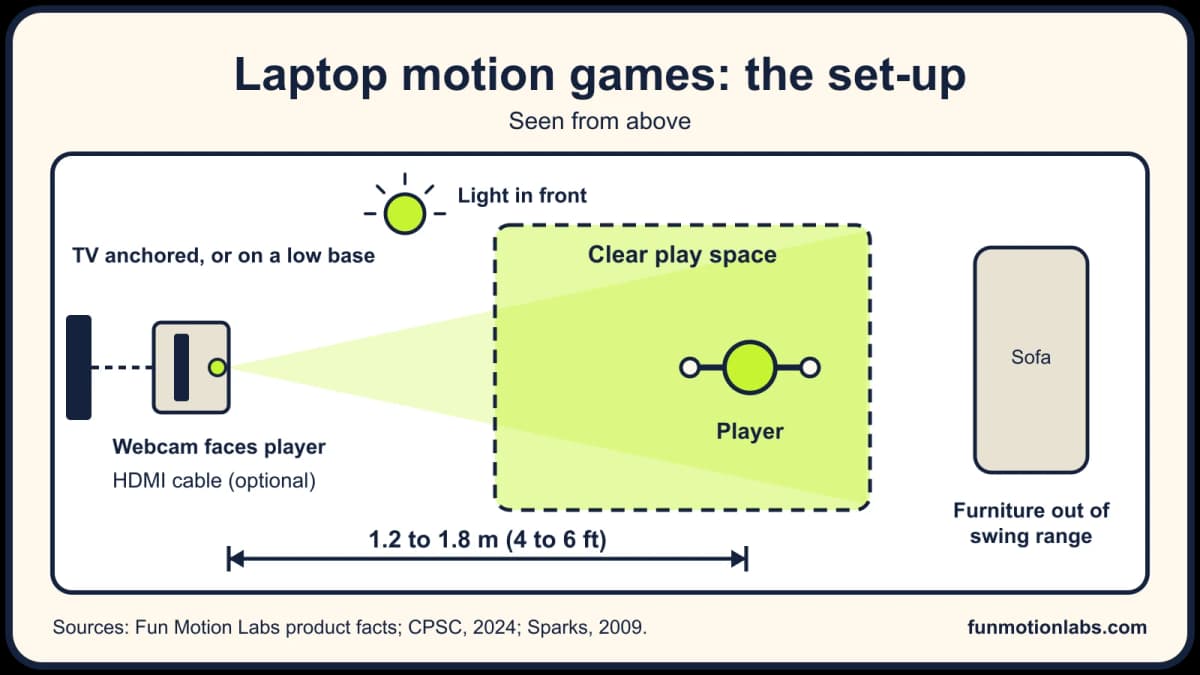
For motion games on a laptop, you need the computer and its webcam, about 1.2 to 1.8 m (4 to 6 ft) of clear floor and light on the player. An HDMI cable to the TV is optional. Other makers state their own needs.
- A Windows or Mac laptop or PC with a built-in or USB webcam. Our full system requirements come at launch.
- Clear floor in front of the camera, about 1.2 to 1.8 m (4 to 6 ft) deep.
- Light on the player from the front, such as a lamp or a window behind the screen.
- An HDMI cable to a TV or monitor, if you want the big screen. The webcam still points at the player.
- Internet to download the games. After that, ours play offline.
Is it really just the webcam? For our games, yes. There's no other gadget to buy.
Whatever you play, give the player room to swing. Doctors have reported injuries when players hit furniture or walls during motion games. In one 2009 report, cuts to the hand were the most common. Those reports are small and mostly about adults, but moving a coffee table costs nothing. The US Consumer Product Safety Commission (2024) advises anchoring TVs and furniture to the wall. A low, sturdy TV base, pushed back, is the other option.
On a Mac, a green light beside the camera shows it's on (Apple). On Windows 11, camera access lives in Start > Settings > Privacy & security > Camera (Microsoft).
Where our games fit, and where they don't
Fun Motion Labs makes motion games for Windows and Mac computers with a webcam. You download each game, buy it once and play offline, with no console, sensor or controller.
We make Fun Motion Labs, so weigh our entry with that in mind. Six of our eight games have age guides that start between 3 and 6. In Magic Easel (3+), your child paints in the air with their hands. Learn & Leap (3 to 7) has them reach for the right number, letter or color, with Fox as a guide. In Fruit Swipe (4+) they swing their arms to slice fruit, and in Bop-a-Mole (4+) they bop moles with quick hands. From 6, Zombie Run asks kids to run, jump, duck and dodge, and Brick Blast turns their body into the paddle.
Fruit Swipe and Bop-a-Mole take two players in front of the same camera, which suits a 5- and a 7-year-old who both want a go. Tracking and voice commands run on your computer. Your webcam video is never saved or uploaded.
We launch in November 2026. Checkout opens at launch, with no pre-orders (our launch news), and you can see every game's age guide now.
Our games aren't a console or a TV box, and they run on Windows and Mac only, with no Chromebook, iPad or phone version listed. They're brand new, so there are no reviews yet. The games for under-6s are mostly arms and reaching rather than whole-body play.
Our games are a good fit if you have a Windows or Mac computer that's free in the evenings and you'd rather buy games once. Check first that the computer can come to a room with clear floor.
When does a console or TV box suit better?
A console or a TV camera box can suit a family better when there's no spare computer, or when the computer is needed for work. It also suits anyone who wants a box that stays plugged in by the TV.
Nex Playground tracks up to four players at once, depending on the game, and Nex recommends it for ages 5 and up. We looked at what $299 buys and what the pass costs in another guide. LeapFrog's LeapMove is another camera box for the TV, made for ages 4 to 7 (LeapFrog). There are more side by side in our Nex Playground alternatives guide, and console camera options in what kids can play instead of Kinect.
Active games are one extra way to move, not a replacement for outdoor play, sport or free play. Whether they count as exercise is a question we looked at separately. Any active game can lose its pull after a few weeks, ours included.
Try this today
You can test the set-up tonight without buying anything.
- Open the laptop's camera app and step back until your whole body is in the picture.
- Check that distance. About 1.2 to 1.8 m (4 to 6 ft) is the target for ours.
- Turn on a lamp in front of you, so the light falls on your face.
- Plug the laptop into the TV if you have a cable, and keep the camera pointed at the player.
- Try a free browser game to see how your child takes to it.
The laptop stays on the kitchen table. It just gets turned around to face the room, with the rug pushed back.
For more on play at home, see our page for parents.
FAQ
Can we plug the laptop into the TV instead of using its screen?
Yes, for our games. Connect the laptop to the TV or a monitor with an HDMI cable. Keep the webcam pointed at the player, not at the TV. For other webcam games, check the maker's page. A TV camera box like Nex Playground only works with a TV or projector.
How much space do we need in a small apartment?
For our games, about 1.2 to 1.8 m (4 to 6 ft) of clear floor in front of the camera is enough. Nex asks for about 1.8 x 1.8 m (6 x 6 ft) for its TV box. In a small apartment (a flat in the UK), that may mean pushing back a chair or the coffee table.
Can two kids play motion games on one laptop?
Some can. In our games, Fruit Swipe and Bop-a-Mole let two players stand in front of the same camera. Zazti has a two-player mode, and Starri lists local play with a friend on Steam. If two play at once, give each child their own patch of floor. In other games, kids take turns.
Sources
- Nex. Nex Playground shop page (US). Checked 31 October 2026.
- Nex. How it works. Checked 31 October 2026.
- Nintendo. Nintendo Switch 2 Camera. Checked 31 October 2026.
- Nintendo. Super Mario Party Jamboree, Nintendo Switch 2 Edition + Jamboree TV. Checked 31 October 2026.
- Nintendo. Compare Nintendo Switch Online memberships. Checked 31 October 2026.
- Zazti. Zazti home page and privacy policy. Checked 31 October 2026.
- Steam. Starri. Checked 31 October 2026.
- Apple App Store. MovePlay. Checked 31 October 2026.
- itch.io. Games tagged "webcam", and Steam, search for "webcam motion". Our search, 31 October 2026.
- Sparks D and others (2009). Wii have a problem: a review of self-reported Wii related injuries. Informatics in Primary Care.
- US Consumer Product Safety Commission (February 2024). CPSC reminds families to tackle the deadly hazard of TV and furniture tip-overs.
- Apple Support. Use the camera on Mac.
- Microsoft Support. Manage app permissions for a camera in Windows.
- LeapFrog. LeapMove. Checked 31 October 2026.
Diagram: Fun Motion Labs. Cover photo by cottonbro studio on Pexels.
We cite health bodies for health facts and never claim our games change your health. Our editorial policy